Public vs Private IP : What is the difference?
Oct 5, 2025
What is an IP Address?
An IP address (Internet Protocol address) is a unique number assigned to every device connected to a network. It acts as a digital identifier that allows computers, smartphones, and other devices to communicate with each other over the internet.
Understanding how IP addresses work is essential for managing networks, troubleshooting connectivity issues, and protecting your online privacy.
There are two main types of IP addresses you should know: Public IP addresses and Private IP addresses. Both are crucial for making network communication possible, but they work in very different ways.
Public IP Address
A public IP address is the unique identifier assigned to your network by your Internet Service Provider (ISP). It’s how your home or business connects to the outside world.
You can think of it as your home address on the web — it tells other servers where to send information back to you.
Public IPs are globally unique, meaning no two devices on the internet share the same public IP at the same time.
For example, 8.8.8.8 is Google’s public DNS server — one of the most recognizable IPs on the internet.
Characteristics of a Public IP Adress:
It allows communication between networks over the internet.
It is assigned by your ISP and can be dynamic (changes regularly) or static (remains constant).
It is visible to anyone on the internet.
It can reveal your approximate location and internet provider.
Why public IPs matter
Public IP addresses are essential for hosting websites, playing online games, or connecting to remote servers.
However, because they’re publicly visible, they can also be targets for cyberattacks or used to track your online activity.
That’s why many users choose to hide their public IPs using VPNs (Virtual Private Networks) — to protect their identity and increase online privacy.
Private IP Address
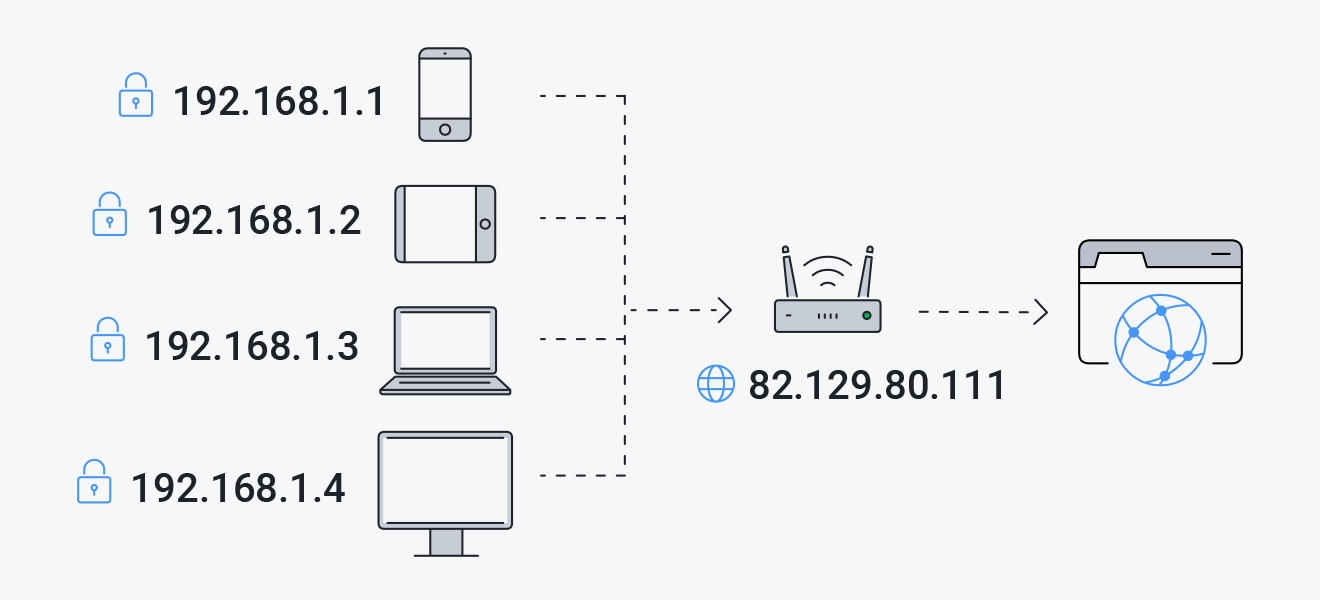
A private IP address is used within local networks — for example, your home Wi-Fi or office network. It identifies devices such as your laptop, phone, smart TV, or printer inside your internal network but is not visible to the outside world.
Think of a private IP like your room number inside a hotel. The outside world only sees the hotel’s main address (the public IP), but inside the hotel, each room (device) has its own number (private IP) for internal communication.
Characteristics of a Private IP Adress:
It is used only inside local networks.
It is not routable on the internet, meaning devices outside can’t access it directly..
It is automatically assigned by your router using DHCP (Dynamic Host Configuration Protocol).
It allows devices to communicate internally without using the internet.
Examples of Private IP Ranges
192.168.0.0 to 192.168.255.255.
10.0.0.0 to 10.255.255.255
172.16.0.0 to 172.31.255.255
Why private IPs matter
Private IPs allow multiple devices in your home or office to share one public IP through a process called Network Address Translation (NAT).
This saves IP space and adds a layer of protection, since external users can’t directly reach devices within your local network.
In short, your public IP connects your network to the internet, while private IPs connect devices within that network.
Both are essential for smooth, secure online communication.
Want to know your IP?
You can instantly check your current public IP address using our free tool What’s My IP — it will show your IP, location, ISP, and other useful details.